
Richard
Author
Share this article
How to Build a Store Locator Website Quickly and Easily with Row.so
A store locator helps customers find your stores, authorized dealers, retail partners, or service locations without the hassle of browsing through endless lists.
Whether you're running a retail brand, managing a franchise network, or building a directory of local businesses, a store locator makes it easier for customers to discover nearby locations and get directions.
The challenge? Building one from scratch can involve maps, location data, search filters, responsive layouts, and ongoing data maintenance.
With Row.so, you can build a professional store locator website in minutes, without writing code or managing complex infrastructure.
What Is a Store Locator Website?
A store locator is a website or web page that displays physical locations on an interactive map and helps visitors find the right place.
A typical store locator includes:
Interactive maps: Display store locations using map pins.
Location search: Help visitors discover stores by city, region, or proximity.
Store details: Show addresses, phone numbers, opening hours, websites, and other information.
Search and filters: Let customers narrow down results by location, category, or custom attributes.
Directions: Help visitors navigate to a selected store.
Mobile-friendly design: Make it easy to find locations while on the go.
Store name and description
Street address and city
Latitude and longitude, where available
Phone number and website
Opening hours
Store category
Logo or store images
Retail store locators
Restaurant and café finders
Authorized dealer directories
Franchise location maps
Service center finders
Coworking space directories
Local business directories
For businesses with multiple locations, these features can improve the customer experience while making location information easier to manage.
Why Build Your Store Locator with Row.so?
Row.so is an AI-powered directory website builder that includes a dedicated Map Locator view. Instead of developing a mapping interface and location database from scratch, you can turn your location data into a searchable, map-based directory.
1. Turn Your Location Data into a Store Locator
Already have a spreadsheet containing your store locations? You don't need to start over.
Row.so supports Google Sheets and CSV workflows, making it easier to bring existing location data into your directory.
You can organize your locations with fields such as:
You can also use custom fields to capture information specific to your business.
Once your data is organized, configure your directory to display the information customers need.
2. Display Locations on an Interactive Map
A store locator should do more than display a list of addresses.
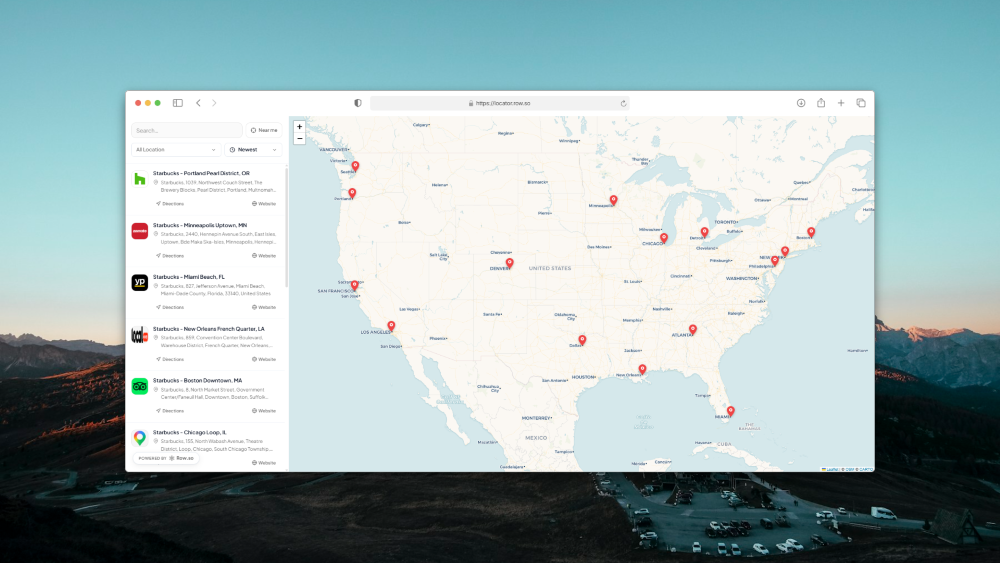
Row.so's Map Locator view combines an interactive map with location listings, allowing visitors to explore stores visually and find relevant locations more easily.
Depending on your configuration, visitors can use features such as geocoded map pins, nearby search, and directions.
You can use this experience for:
You can also use the Map Locator for other location-based projects, including travel guides and city directories.
3. Help Customers Find the Right Location
As your business expands, a growing number of locations can make your store locator harder to navigate.
Row.so supports search, custom fields, categories, and configurable filters to help visitors find the locations that match their needs.
For example, a fitness brand could let visitors filter locations by city and available facilities. A retailer could organize stores by region or store type.
You can customize your listing fields and filters to suit your business instead of being restricted to a fixed template.
4. Keep Your Location Data Up to Date
Managing locations across multiple systems can quickly become frustrating.
With Row.so's two-way Google Sheets sync, your spreadsheet can serve as a central place to manage location information. Changes made in Row.so can sync back to Google Sheets, while spreadsheet updates can sync to your directory.
This is especially useful when you manage dozens or hundreds of stores and need to update addresses, contact details, opening hours, or other listing information regularly.
Your team can continue working with familiar spreadsheet workflows without having to rebuild the website whenever information changes.
5. Customize the Store Locator to Match Your Brand
Your store locator should feel like part of your website, not a separate tool with an unrelated design.
Row.so lets you customize layouts, colors, typography, page sections, listing fields, and other design elements.
You can create a branded experience that matches your existing website and business identity.
You can also connect your own custom domain, so customers can access your store locator through an address such as locations.yourbrand.com, subject to your domain configuration.
6. Launch Without Managing Servers or Writing Code
Building a custom store locator traditionally requires developers to handle the database, map integration, search functionality, frontend, hosting, and ongoing maintenance.
Row.so brings many of these pieces together in one platform.
You can focus on your location data, brand, and customer experience rather than spending weeks building the underlying infrastructure.
Row.so also provides hosting, SSL, and SEO features to help you publish and maintain your directory.
How to Build a Store Locator with Row.so
Here's a straightforward workflow for getting started.
Step 1: Create Your Directory
Visit Row.so and create a directory for your business or project.
You can start with an existing directory, use available templates, or build a new directory based on your requirements.
Step 2: Import Your Store Locations
Prepare your location data in Google Sheets or a CSV file.
Make sure each location has a clear name and address. Add other useful information, such as phone numbers, opening hours, categories, and website links.
If you're using coordinates, include latitude and longitude where appropriate to support accurate map placement.
Import or connect your data using the available workflow.
Step 3: Configure Your Map Locator
Choose the Map Locator view for your directory.
Configure the location information displayed on each listing and adjust your fields, categories, and filters to help customers navigate the results.
Check that your addresses and map locations are accurate before publishing.
Step 4: Customize Your Design
Adjust the directory's appearance to match your brand.
Customize the page layout, colors, typography, navigation, and listing details. Preview your changes and make sure the experience works well on desktop and mobile devices.
Step 5: Connect Your Domain and Publish
Once your store locator is ready, connect your custom domain if needed and publish your website.
Test the search, map pins, location details, and directions to ensure visitors can find the right store without confusion.
You can then update your location data as your business grows.
Who Should Use Row.so to Build a Store Locator?
Row.so is useful for more than traditional retail stores.
Retail brands: Help customers discover nearby branches and outlets.
Franchise businesses: Organize franchise locations in a single searchable directory.
Manufacturers and distributors: Help customers find authorized dealers and resellers.
Service businesses: Make it easier to locate repair centers, offices, and service providers.
Agencies: Build branded store locators for clients without developing a custom platform for every project.
Entrepreneurs: Create niche directories around restaurants, cafés, shops, attractions, or local services.
The same Map Locator approach can support many different business models, depending on the data and features you configure.
Frequently Asked Questions
Can I build a store locator without coding?
Yes. Row.so lets you create and customize a directory with a Map Locator view without building the entire application from scratch.
Can I import store locations from Google Sheets?
Yes. Row.so supports Google Sheets integration with two-way synchronization, making it easier to manage location data in a spreadsheet.
Can I use my own domain?
Yes. You can connect a custom domain to your Row.so directory and configure it for your brand.
Can I customize the fields shown for each store?
Yes. You can configure custom fields to display relevant information such as addresses, contact details, websites, categories, and other location attributes.
Is Row.so suitable for businesses with multiple locations?
Yes. It can be used for multi-location businesses, dealer networks, franchise directories, and other projects that need searchable location listings. Your specific setup will depend on your data structure and requirements.
Build Your Store Locator Today
Creating a store locator doesn't have to mean hiring developers, stitching together multiple tools, or maintaining a custom mapping application.
With Row.so, you can bring your location data together, display it on an interactive map, customize your directory, and publish a branded website without building everything from scratch.
Whether you're helping customers find your nearest store or creating a directory of locations across multiple regions, Row.so gives you a practical way to get started quickly.
Ready to build your store locator?
Start building with Row.so and turn your location data into an interactive directory today.
Explore the Map Locator examples to see what's possible.