
Richard
Author
Share this article
Building a directory website used to mean dealing with databases, servers, custom development, and ongoing maintenance.
Today, you can build and launch a professional directory without writing code.
Whether you want to create an AI tools directory, SaaS directory, local business directory, job board, startup directory, or niche marketplace, no-code tools make the technical side much simpler.
In this guide, we'll walk through how to build a directory website without code, what you need to launch, and how to turn your directory into a real business.
What Is a Directory Website?
A directory website organizes information into searchable listings.
The listings can be almost anything:
- AI tools
- SaaS products
- Startups
- Local businesses
- Restaurants and cafes
- Jobs
- Agencies and freelancers
- Real estate
- Products
- Events
- Courses
- Online communities
- Listings and custom fields
- Categories and tags
- Search and filters
- Images and media
- SEO settings
- Custom domains
- Hosting and SSL
- Listing submissions
- Payments
- Featured listings
- Analytics
- Best AI tools for marketers
- SaaS tools for small businesses
- Web design agencies in New York
- Remote jobs for developers
- Best coffee shops in Hanoi
- Startup tools for founders
- Cursor alternatives
- Shopify apps for ecommerce stores
- Tool name
- Website URL
- Description
- Category
- Pricing
- Features
- Platform
- Tags
- Logo
- Screenshots
- Writing
- Marketing
- Design
- Video
- Productivity
- Coding
- Logo
- Typography
- Colors
- Navigation
- Homepage
- Listing cards
- Listing pages
- Search
- Filters
- Footer
- A directory builder
- A domain name
- Your listing data
- Analytics
- A payment provider if you want to monetize
- Finding a valuable niche
- Collecting high-quality listings
- Creating useful pages
- Getting your first visitors
- Finding potential paying customers
- Testing different monetization models
- Listings
- Search
- Categories
- Filters
- Useful listing pages
- SEO
- A clear monetization strategy
- AI tool directories
- SaaS directories
- Startup directories
- Local business directories
- Job boards
- Product directories
- Agency directories
- Niche marketplaces
A directory doesn't need hundreds of features to be useful.
At its core, you need a collection of useful listings, a simple way for visitors to browse and search them, and a clear reason for people to use your website.
The opportunity is to turn that simple database into a valuable resource for a specific audience.
Can You Build a Directory Website Without Coding?
Yes.
You no longer need to build a database, admin dashboard, search system, listing pages, hosting infrastructure, and SEO system from scratch.
A modern no-code directory builder can handle most of the technical work for you.
Depending on the platform, you can manage:
This lets you spend more time on the things that actually make a directory successful: finding a good niche, building useful listings, getting traffic, and monetizing your audience.
How to Build a Directory Website Without Code
The process is simpler than you might think.
1. Choose a Specific Niche
The first step is choosing what your directory will be about.
Don't start with something extremely broad like "a directory of businesses."
Instead, focus on a specific audience, industry, location, or problem.
For example:
A focused niche gives you a much clearer audience and makes it easier to create valuable content.
It also makes monetization easier because you know exactly who your potential customers are.
2. Decide What Information Each Listing Needs
Before building the website, think about your listing structure.
For example, an AI tools directory might include:
Keep the structure consistent across your listings.
Structured data makes it easier for visitors to compare listings and easier for your website to support search, filtering, and SEO.
You don't need dozens of fields.
Start with the information your visitors actually need to make a decision.
3. Choose a No-Code Directory Builder
Once you know what you're building, choose the platform that will power your directory.
This is where a no-code solution can save you weeks or months of development.
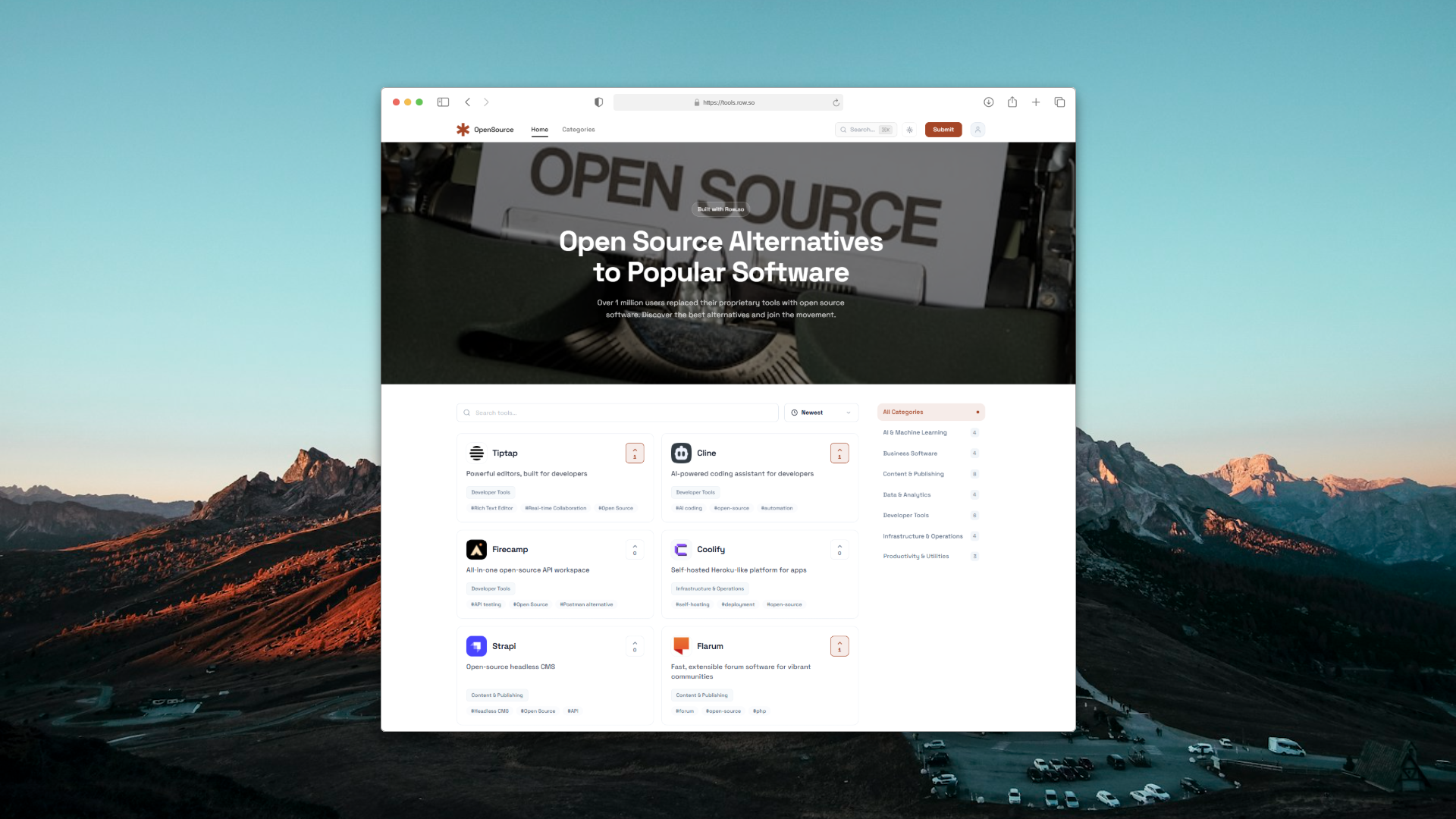
Row.so lets you create directories without building the underlying infrastructure yourself.
You can create listings, add custom fields, organize categories, import data, customize your website, manage SEO, connect your own domain, and monetize your directory.
You can also use Google Sheets or CSV data if you already manage your listings in a spreadsheet.
This is particularly useful when you have hundreds or thousands of listings and don't want to manually recreate your data inside a CMS.
4. Add Your Listings
Now it's time to populate your directory.
You can start small.
You don't need thousands of listings before launching.
For a new niche directory, even 20 to 50 genuinely useful listings can be enough to create the first version of your website.
If your data already exists in Google Sheets or CSV files, importing it can significantly speed up the process.
Focus on quality rather than quantity.
A directory with 100 useful listings is much more valuable than one with 10,000 low-quality or incomplete listings.
5. Organize Listings With Categories and Filters
A good directory helps visitors find what they need quickly.
Use categories, tags, locations, pricing, features, or other attributes that make sense for your niche.
For example, an AI tools directory could let visitors browse by:
You can then add filters such as pricing, platform, or specific features.
Don't add filters simply because they're available.
Every filter should help users narrow down their options and reach the right listing faster.
6. Create SEO-Friendly Listing Pages
SEO is one of the biggest opportunities when you build a directory website.
Every useful listing can potentially have its own page.
For example:
yourdirectory.com/tools/chatgpt
yourdirectory.com/tools/cursor
yourdirectory.com/tools/notion
These pages can target specific search queries and create a large organic search footprint over time.
But simply creating thousands of pages isn't an SEO strategy.
Avoid publishing pages with almost identical or very thin content.
Instead, make each listing page useful.
Add unique descriptions, relevant attributes, images, internal links, related listings, and other information that helps visitors.
The goal isn't to create as many pages as possible.
The goal is to create pages that deserve to rank.
7. Customize the Design
Your directory should feel like a real website, not a spreadsheet published on the internet.
Customize the important parts of the experience:
The design should match the type of directory you're building.
A local business directory might benefit from maps and location-based browsing.
An AI tools directory might need strong search, categories, filters, and comparison pages.
A job board might focus more heavily on search, job categories, locations, and application links.
The best directory design is usually the one that makes the information easiest to consume.
8. Connect a Custom Domain
Once your directory is ready, connect your own domain.
A custom domain makes your project look more professional and gives you control over your brand.
Instead of:
yourdirectory.row.so
you can use:
yourdirectory.com
With Row.so, you can connect your custom domain and use managed hosting and SSL without having to configure your own servers.
9. Add a Way for People to Submit Listings
Once your directory starts attracting visitors, you can let businesses, founders, creators, or other users submit their own listings.
This can turn your directory from a static database into a growing marketplace.
For example:
Submit your SaaS to our directory
You can make submissions free to grow your database or charge for them from the beginning.
You can also offer premium options such as featured placement or sponsored listings.
This creates a simple monetization loop:
More traffic → more submissions → more revenue → better directory → more traffic.
How to Monetize a Directory Website
You don't need millions of visitors to make money from a directory.
A smaller directory with a highly targeted audience can often monetize more effectively than a massive general-purpose website.
Paid Listings
Charge companies to add their products or businesses to your directory.
For example:
Submit your company for $49/year.
Annual pricing can be particularly attractive for niche directories because it creates recurring revenue without requiring a complicated subscription product.
Featured Listings
Give businesses the option to appear higher in search results or in a featured section.
This works well when your directory already receives targeted traffic.
Sponsored Listings
You can sell sponsorships for specific categories, pages, newsletters, or sections of your website.
For example, an AI tools directory could sell a monthly sponsorship for its "Best AI Writing Tools" category.
Memberships
If your directory provides valuable data or resources, you can create a paid membership.
Premium members might receive access to advanced filters, exclusive listings, research, or other valuable information.
Advertising
Advertising can work once your directory has meaningful traffic.
However, ads shouldn't necessarily be your first monetization strategy.
For many niche directories, selling listings or sponsorships can generate more revenue from a smaller audience.
Lead Generation
If your directory connects customers with businesses, you can charge for qualified leads.
This can work particularly well for local services, agencies, consultants, and other high-value businesses.
How Much Does It Cost to Build a Directory Without Code?
One of the biggest advantages of using a no-code platform is that you don't need to build and maintain your own infrastructure.
A basic directory can be built with:
You don't need to hire a developer to build the database or create a custom admin dashboard.
You also don't need to manage servers, SSL certificates, deployments, or database maintenance yourself.
Your actual cost will depend on the platform, domain, payment providers, and other services you choose.
The important thing is that you can validate the directory idea before spending heavily on custom development.
How Long Does It Take to Build a Directory Website?
A simple directory can potentially be launched in a day.
A larger directory with hundreds or thousands of listings, advanced filters, SEO content, custom branding, payments, and other features will naturally take longer.
But the technical setup isn't usually the hardest part.
The difficult part is creating something people actually want to use.
Your time is better spent on:
Launch the first version as soon as it is useful enough.
You can improve the product after you have real users.
No-Code or Custom Development?
For a new directory, starting with no-code is often the faster approach.
Custom development makes sense when you have requirements that existing platforms can't support or when your directory has become a much larger product.
But building everything yourself before validating the idea can be expensive and slow.
A better approach is:
Start with no-code → validate the idea → get users → monetize → build custom features only when necessary.
This reduces technical risk and lets you focus on the business instead of infrastructure.
Common Mistakes When Building a Directory
Trying to Build Everything Before Launch
You don't need dozens of features before your first visitor.
Start with the essentials:
Add more features based on what your users actually need.
Choosing a Niche That Is Too Broad
A broad directory is difficult to differentiate.
Instead of building "a directory of software," consider something more specific like "AI tools for ecommerce teams."
You can always expand later.
Publishing Thousands of Thin Pages
More pages don't automatically mean more SEO traffic.
If your directory generates thousands of pages with little unique value, those pages may not perform well.
Focus on useful listings and genuinely helpful content.
Depending Entirely on SEO
SEO is a powerful long-term acquisition channel, but it shouldn't be your only marketing strategy.
Promote your directory through communities, social media, partnerships, direct outreach, newsletters, and relevant online communities.
The first users can help you understand which listings and features are actually valuable.
Build Your Directory With Row.so
If you're looking for how to build a directory website without code, Row.so gives you the tools to go from an idea to a live directory without building the entire technical stack yourself.
Create your listings, import data from Google Sheets or CSV, add custom fields, organize categories, build SEO-friendly pages, connect your custom domain, accept submissions, and monetize your audience.
You can use Row.so to build different types of directories, including:
The technology is no longer the biggest barrier to launching a directory.
The harder part is finding a niche worth owning and creating a resource that people genuinely find useful.
Pick a niche. Build the directory. Get your first users. Then grow from there.